|
SNS-HDR can save images in four formats: JPEG, TIFF-8, TIFF-16 and SNSX. The SNSX format is the internal format of SNS-HDR.
The SNSX format allows you to save the image together with the complete set of data generated in SNS-HDR (masks, history, etc.). This format is intended for images that require
re-editing.
To save an image in the JPEG or TIFF format, click the  icon located on the toolbar.
After clicking the icon, a dialog window will open in which you should specify the location of the saved image, its name and format.
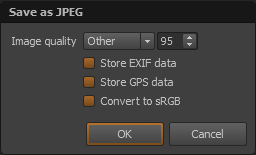
After confirming the choice, a dialog window will open, depending on the selected format type. For the JPEG format. icon located on the toolbar.
After clicking the icon, a dialog window will open in which you should specify the location of the saved image, its name and format.
After confirming the choice, a dialog window will open, depending on the selected format type. For the JPEG format.
In this window you should specify:
- The image quality
- Whether EXIF data should be saved
- Whether GPS data should be saved
- Whether the image should be converted to the sRGB color space
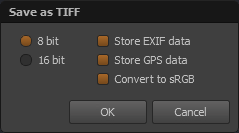
When saving in the TIFF format.
In this window you should specify:
- Whether the image should be saved using 8 or 16 bits per color component
- Whether EXIF data should be saved
- Whether GPS data should be saved
- Whether the image should be converted to the sRGB color space
To save an image in the SNSX format, click the  icon. icon.
When saving the same image again, the program will automatically overwrite the previously saved file.
To save the image file under a different name or in a different format, in the case of the JPEG or TIFF format click the  icon,
or in the case of an image saved in the SNSX format, click the arrow icon located next to the icon and choose the save option from the drop-down list. icon,
or in the case of an image saved in the SNSX format, click the arrow icon located next to the icon and choose the save option from the drop-down list.
|