|
SNS-HDR comes with predefined parameter sets (presets), which provide an easy way to establish the base parameters for the processed image.
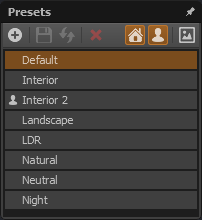
Presets are stored in the user's documents folder, in the SNS-HDR\Presets subfolder. Presets are divided into two groups: predefined and user presets.
Predefined presets are the ones supplied with the software, while user presets are the ones created by the user of the program. User presets are marked with the  icon, displayed before the preset name. icon, displayed before the preset name.
Configuring the preset view
Individual preset groups can be hidden. Predefined presets can be hidden or shown by clicking the  icon, and user presets
by clicking the icon. icon, and user presets
by clicking the icon.
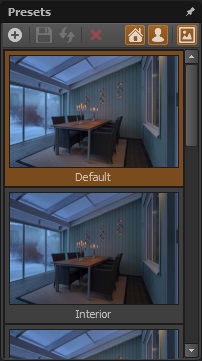
Presets can be displayed together with a preview of the resulting image. To show or hide the image preview, click the  icon. icon.
Previewing and selecting a preset
To see how the processed image will look after applying a preset, simply hover the mouse over the preset. To select a preset, click it.
Creating a new preset
The program allows you to create user presets.
To create a new preset, click the  icon, then enter a unique name for the new preset in the dialog box that appears.
Once the name is confirmed, a new preset will be created, storing the current image parameter settings. icon, then enter a unique name for the new preset in the dialog box that appears.
Once the name is confirmed, a new preset will be created, storing the current image parameter settings.
Modifying a preset
Presets can be modified, including the predefined ones. To modify a preset, saving the current parameter settings in it, click the  icon.
If a predefined preset has been modified, the same icon will be displayed before the preset name. icon.
If a predefined preset has been modified, the same icon will be displayed before the preset name.
Restoring a preset's default values
If a predefined preset has been modified, its default settings can be restored.
To do this, select the preset (provided it is not the current preset) and then click the  icon. icon.
Deleting a preset
User presets can be deleted.
To do this, select the preset (provided it is not the current preset) and then click the  icon. icon.
|